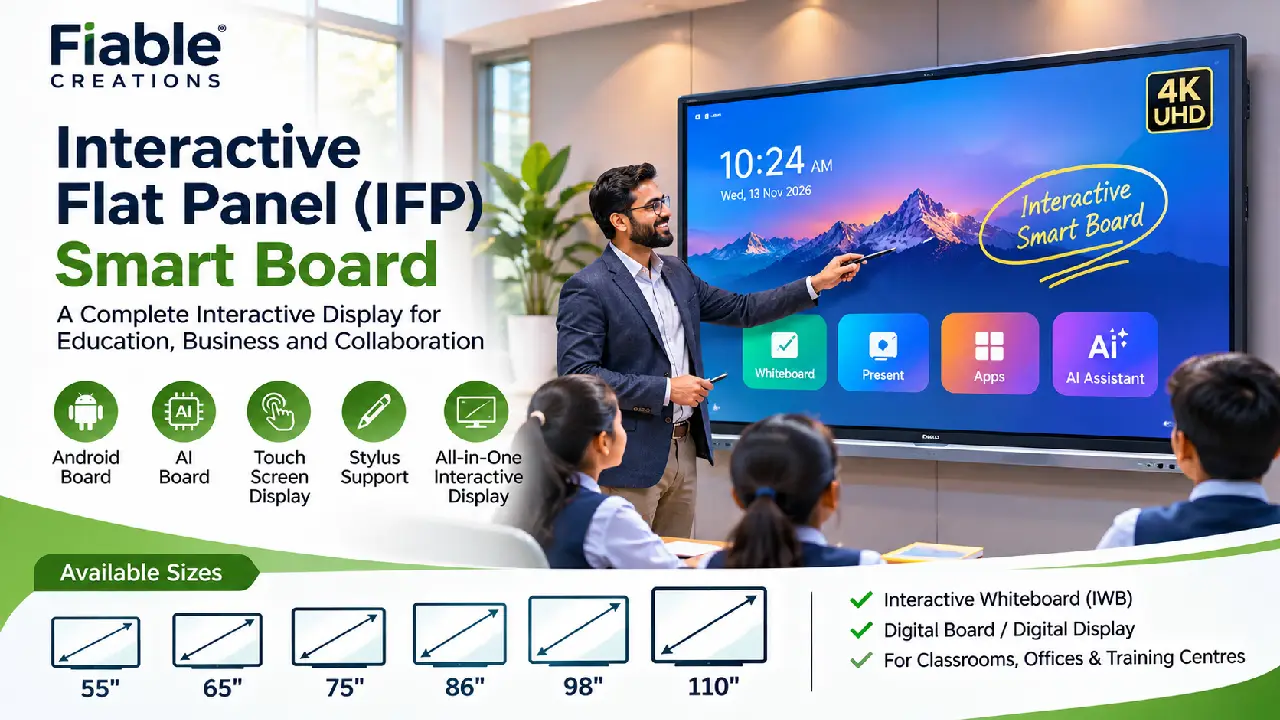
Technology is changing the way people teach, learn, present and collaborate. Traditional blackboards, whiteboards and projector-based presentation systems are gradually being complemented by smarter digital solutions that make information more engaging and accessible.
One such innovation is the Smart Board, also known as an Interactive Flat Panel (IFP), Interactive Whiteboard (IWB) or Digital Board.
A modern interactive smart board combines a high-resolution display, touchscreen technology, an integrated operating system and interactive software into a single device. It allows teachers to write directly on the screen, business professionals to conduct interactive presentations, and teams to collaborate using digital content.
Whether it is a classroom, corporate boardroom, training centre, conference room or educational institution, an interactive flat panel can make everyday communication more effective.
With different screen sizes available, including 55-inch, 65-inch, 75-inch, 86-inch, 98-inch and 110-inch models, organisations can select a display according to their space and requirements.
In this guide, we explore smart board technology, its important features, different types, applications and how to choose the right interactive display.
What Is a Smart Board or Interactive Flat Panel (IFP)?
A Smart Board is a large touchscreen digital display that allows users to interact directly with the content displayed on the screen.
An Interactive Flat Panel (IFP) combines display technology, touch functionality, computing capabilities and interactive software into one integrated solution.
Unlike traditional projector-based classroom systems, a modern interactive flat panel does not require a separate projector to display content. Users can write, draw, open applications, browse the internet, display presentations and annotate documents directly on the screen.
A typical interactive flat panel may include:
- 4K Ultra HD display technology.
- Multi-touch touchscreen functionality.
- Built-in Android operating system.
- Interactive whiteboard software.
- Digital annotation and writing tools.
- HDMI, USB and USB-C connectivity.
- Wi-Fi and wireless screen sharing.
- Stylus or digital pen support.
- Integrated speakers.
- Compatibility with external computers and other devices.
These features make an all-in-one interactive display a useful solution for modern classrooms, offices and collaborative environments.
Smart Board vs Interactive Whiteboard vs Digital Board: Are They the Same?
People often use different terms when searching for interactive display products. However, many of these terms refer to similar technology.
Understanding these names can help buyers identify the right product.
1. Interactive Flat Panel (IFP)
An Interactive Flat Panel is a modern large-format touchscreen display with built-in interactive capabilities.
It combines display hardware, touch functionality and computing features in a single unit.
IFPs are widely used in schools, colleges, training institutes and corporate offices.
2. Interactive Whiteboard (IWB)
An Interactive Whiteboard allows users to write, draw, annotate and interact with digital content.
The term historically included projector-based interactive boards, but it is also commonly used for modern touchscreen interactive displays.
3. Interactive Smart Board
An interactive smart board combines digital display technology with interactive functions.
Teachers can conduct lessons, display educational videos, solve mathematical problems and use digital learning resources directly on the screen.
4. Digital Board or Digital Display
A digital board is a broader term used for electronic displays that present information, presentations, images and videos.
When touch functionality and interactive software are included, it can function as an interactive digital board.
5. Touch Screen Display or Touch Panel
A touchscreen display allows users to control and interact with digital content through direct touch.
In an interactive smart board, this functionality makes it possible to write, draw, move objects and control applications using fingers or supported styluses.
6. All-in-One Interactive Display
An all-in-one interactive display integrates several technologies into one device, reducing the need for separate equipment.
Depending on the model, it may combine an Android operating system, touchscreen display, interactive whiteboard software, speakers and wireless connectivity.
In simple terms, these names describe overlapping categories of interactive display technology. The actual features and capabilities depend on the product configuration.
Important Features of a Modern Interactive Smart Board
When selecting a smart board, buyers should look beyond the screen size. Display quality, touch accuracy, operating system, connectivity and software capabilities all influence the overall experience.
Here are some important features to consider.
1. 4K Ultra HD Display
Display quality is an important factor in an interactive flat panel.
A 4K UHD display offers a resolution of 3840 × 2160 pixels, helping users view text, diagrams, presentations, images and videos with greater detail.
This is especially useful in educational environments where teachers display detailed charts, scientific diagrams, maps and digital learning material.
2. Multi-Touch Technology
Multi-touch technology allows multiple users to interact with the screen simultaneously.
Depending on the model, users can write, draw, zoom, move objects and work together on the same digital canvas.
This feature is particularly useful for group activities, brainstorming sessions and collaborative learning.
3. Built-in Android Operating System
An Android Board is an interactive display equipped with an integrated Android operating system.
It allows users to access supported applications, browse websites, open documents and use interactive whiteboard tools without necessarily connecting an external computer.
Depending on the model, Google EDLA certification may also provide access to licensed Google services and applications, including Google Play Store, Chrome and Google Workspace applications.
4. AI Board Technology
AI Board technology represents the next stage of development in interactive displays.
AI-enabled smart boards can incorporate intelligent tools that make teaching, presentations and collaboration more productive.
Depending on the hardware and software, potential AI-powered capabilities include:
- Handwriting recognition.
- AI-assisted content creation.
- Smart teaching and learning assistance.
- Automatic summarisation of meeting notes.
- Language translation.
- Intelligent annotation.
- Image and diagram assistance.
- AI-supported educational activities.
These capabilities may require specific software, compatible hardware, internet access or additional licences.
When purchasing an AI smart board, check which AI features are actually included rather than assuming that every Android interactive panel offers the same capabilities.
5. Stylus and Digital Pen Support
A Stylus Smart Board allows users to write and draw directly on the display using a digital pen.
This is especially beneficial for teachers, trainers, architects, designers and business professionals.
A supported stylus can make writing more controlled and natural compared with ordinary finger touch.
Typical applications include:
- Writing mathematical equations.
- Drawing diagrams and illustrations.
- Highlighting important presentation content.
- Annotating PDF documents.
- Explaining technical concepts.
- Conducting interactive classroom exercises.
Before purchasing, check stylus compatibility, writing precision, palm rejection, supported pen features and whether the stylus is supplied with the display.
6. Wireless Screen Sharing
Wireless screen sharing allows users to display content from compatible laptops, smartphones and tablets on the interactive flat panel.
Teachers can share educational material, while business professionals can present reports, spreadsheets and presentations without constantly connecting cables.
The available screen-sharing options depend on the display software and connected devices.
7. Connectivity and External Device Support
A good interactive display should provide connectivity options suitable for its intended environment.
Common interfaces include:
- HDMI.
- USB.
- USB Type-C.
- Wi-Fi.
- Bluetooth.
- Ethernet.
- Optional OPS computer expansion, depending on the model.
These connections allow users to connect laptops, external computers, storage devices and compatible accessories.
Different Smart Board Sizes: Which One Should You Choose?
Screen size plays an important role in determining how effectively an interactive display works in a particular environment.
The ideal size depends on room dimensions, viewing distance, seating arrangement, audience size and the type of content being displayed.
Fiable Interactive Flat Panels are available in six screen sizes: 55 inches, 65 inches, 75 inches, 86 inches, 98 inches and 110 inches.
Let's understand their typical applications.
1. 55 Inch Interactive Flat Panel
A 55-inch interactive flat panel is a compact option for smaller rooms and limited spaces.
It can be considered for:
- Small classrooms.
- Coaching centres.
- Meeting rooms.
- Training rooms.
- Small office spaces.
- Individual presentation areas.
It provides touchscreen interaction and digital presentation capabilities without requiring a very large display area.
2. 65 Inch Smart Board
A 65-inch smart board offers a balance between screen size and space requirements.
It can be suitable for:
- Regular classrooms.
- Small and medium-sized training rooms.
- Corporate meeting rooms.
- Coaching institutes.
- Educational laboratories.
- Departmental offices.
For many standard-sized rooms, a 65-inch display can provide a practical presentation and collaboration surface.
3. 75 Inch Interactive Flat Panel
A 75-inch interactive flat panel provides a larger viewing area for classrooms and collaborative spaces.
Common applications include:
- School classrooms.
- College lecture rooms.
- Coaching centres.
- Conference rooms.
- Corporate training centres.
- Educational institutions.
The larger screen helps make presentations, digital lessons and visual learning materials easier to view across a room.
4. 86 Inch Interactive Flat Panel
An 86-inch interactive flat panel is designed for environments that need a larger digital workspace.
It may be suitable for:
- Large classrooms.
- University lecture rooms.
- Corporate boardrooms.
- Training and development centres.
- Conference halls.
- Government institutions.
It offers more screen space for collaborative discussions, presentations and interactive learning activities.
5. 98 Inch Digital Board
A 98-inch digital board is a large-format interactive display suitable for bigger spaces.
It can be considered for:
- Large educational institutions.
- Auditorium presentation areas.
- Corporate boardrooms.
- Large training facilities.
- Institutional conference rooms.
- Collaborative workspaces.
It is particularly useful when multiple people need to view the same information from a greater distance.
6. 110 Inch Smart Board
A 110-inch smart board provides an exceptionally large digital display area.
It may be suitable for:
- Large lecture halls.
- Auditoriums.
- Conference facilities.
- Large institutional training centres.
- Executive presentation spaces.
- Large collaborative environments.
Such displays can create an immersive presentation experience and help large audiences view digital content more comfortably.
How to select the correct size: Do not choose a smart board based on screen size alone. Consider the room layout, seating arrangement, viewing distance, wall dimensions and content requirements before finalising the display.
Where Can Interactive Flat Panels Be Used?
Interactive flat panels are versatile tools that can support several industries and professional environments.
Smart Classrooms and Schools
Smart boards are transforming classroom teaching by making lessons more interactive.
Teachers can display videos, animations, presentations and digital textbooks while explaining concepts directly on the touchscreen.
Students can participate in activities, solve problems and work together on interactive exercises.
Colleges and Universities
Higher educational institutions can use interactive digital boards for lectures, research presentations, technical demonstrations and collaborative learning.
The larger screen sizes are particularly useful in classrooms and lecture halls where visibility is important.
Coaching and Training Institutes
Coaching centres can use an interactive smart board to explain difficult concepts, conduct online lessons and display digital study material.
Stylus functionality is particularly helpful when explaining mathematical problems, equations, charts and diagrams.
Corporate Offices and Boardrooms
In business environments, an interactive flat panel can be used for presentations, brainstorming, video conferencing and project discussions.
Participants can annotate documents, share screens and collaborate on ideas directly on the display.
Government and Institutional Offices
Government organisations and institutions can use digital boards for employee training, workshops, presentations and administrative meetings.
Large interactive displays can also support group discussions and information-sharing sessions.
Skill Development and Training Centres
Interactive boards can support practical demonstrations, digital training material and collaborative activities.
They are useful for institutions offering technical, vocational and professional training programmes.
Benefits of Using an Interactive Smart Board
Investing in an interactive display can offer several advantages over traditional presentation and teaching equipment.
More engaging communication: Videos, animations, digital illustrations and touchscreen interaction can make lessons and presentations more engaging.
Improved collaboration: Multiple participants can interact with the same content, encouraging discussion and participation.
Reduced dependency on traditional projectors: Modern interactive flat panels integrate the display and touch technology into one device.
Flexible presentation options: Users can switch between documents, applications, websites, videos and presentations.
Digital content accessibility: Android-based displays allow users to access compatible applications and digital resources directly.
Better presentation experience: Large, high-resolution screens can make information clearer and easier to present.
Versatile usage: One interactive flat panel can support different activities across classrooms, meeting rooms and training environments.
How to Choose the Best Interactive Flat Panel?
Before purchasing an interactive smart board, evaluate the following factors.
- Screen size: Select 55, 65, 75, 86, 98 or 110 inches according to room requirements.
- Resolution: Prefer an appropriate high-resolution display, such as 4K UHD, for detailed content.
- Touch technology: Check the number of simultaneous touch points and touch response performance.
- Operating system: Evaluate the Android version, software compatibility and update support.
- Google EDLA certification: Check whether the specific model is certified when access to licensed Google applications is important.
- AI capabilities: Ask which AI tools are included, whether they work locally or through cloud services, and whether additional subscriptions are required.
- Stylus support: Verify digital pen compatibility and writing performance.
- Connectivity: Check HDMI, USB, USB-C, Wi-Fi and other required connections.
- Warranty and support: Review installation, warranty, training and after-sales support arrangements.
- Budget and value: Compare the complete specifications and long-term support rather than considering only the initial purchase price.
Why Choose Fiable Interactive Flat Panels?
Fiable Creations offers Fiabitron Interactive Flat Panels, designed for modern classrooms, corporate meetings, training environments and collaborative workspaces.
The product range combines touchscreen technology, digital display capabilities and integrated Android functionality to support interactive communication.
Key highlights of Fiable Interactive Flat Panels include:
- Multiple Screen Sizes: Available in 55, 65, 75, 86, 98 and 110 inches.
- 4K UHD Display: High-resolution visual experience for presentations, lessons and multimedia content.
- Multi-Touch Technology: Supports up to 20 touch points for interactive collaboration.
- Android Integration: Access supported applications and digital resources directly on the display.
- Google EDLA-Certified Options: Access to the Google ecosystem on supported certified models.
- Wireless Screen Sharing: Share content from compatible laptops, tablets and smartphones.
- Modern Connectivity: HDMI, USB-C, Wi-Fi and other connectivity options.
- Anti-Glare Display: Designed to improve viewing comfort in different indoor lighting conditions.
Fiable Interactive Flat Panels are manufactured in India and are designed to support both education and corporate applications.
Whether you are planning a smart classroom, upgrading a boardroom or equipping a training centre, Fiable offers different interactive display sizes to explore.
Explore the Fiable Interactive Flat Panel range:
https://fiablecreations.com/fiabitron-interactive-flat-panels-redefining-smart-collaboration/
Frequently Asked Questions (FAQs)
1. What is an Interactive Flat Panel (IFP)?
An Interactive Flat Panel is a large touchscreen digital display that combines display technology, touch interaction, computing capabilities and interactive software. It is commonly used in classrooms, meeting rooms, training centres and collaborative environments.
2. What is the difference between a smart board and an interactive whiteboard?
A smart board is a general term commonly used for an interactive digital display. An interactive whiteboard refers to a system that allows users to write and interact with digital content. Modern interactive flat panels combine these functions in a single touchscreen device.
3. What screen sizes are available in interactive flat panels?
Interactive flat panels are available in several sizes depending on the manufacturer and product range. Fiable offers 55-inch, 65-inch, 75-inch, 86-inch, 98-inch and 110-inch interactive flat panels.
4. What is an Android Board?
An Android Board is an interactive flat panel with an integrated Android operating system. It allows users to access compatible applications, browse websites, open documents and use digital whiteboard software without always requiring an external computer.
5. What is an AI Board?
An AI Board is an interactive display that incorporates artificial intelligence features to support activities such as content generation, handwriting recognition, smart assistance, lesson preparation and meeting productivity. Actual capabilities vary according to the hardware and software.
6. What is a Stylus Smart Board?
A Stylus Smart Board supports writing and drawing using a digital pen or compatible stylus. It is useful for teachers, students, designers and business professionals who regularly annotate documents, create diagrams or write directly on the screen.
7. Is a 75-inch smart board suitable for classrooms?
A 75-inch smart board can be a suitable option for many standard classrooms. However, the final selection should depend on classroom dimensions, seating arrangements, viewing distance and the number of students.
8. Which is better: a 65-inch or 86-inch interactive flat panel?
A 65-inch panel may be appropriate for smaller classrooms and meeting rooms, while an 86-inch panel can be more suitable for larger classrooms, boardrooms and training spaces. Both options should be compared on the basis of their hardware and software specifications.
9. Can an interactive digital board be used for corporate meetings?
Yes. Interactive digital boards can support presentations, video conferencing, brainstorming, document annotation and collaborative discussions. They are useful for modern meeting rooms and corporate training environments.
10. Do interactive flat panels support wireless screen sharing?
Many modern interactive flat panels support wireless screen sharing from compatible devices. The supported sharing methods and applications depend on the specific model and software configuration.
Smart boards and interactive flat panels are becoming important tools for modern education, corporate collaboration and digital communication.
With features such as 4K displays, multi-touch functionality, Android integration, wireless screen sharing and stylus support, these devices offer much more than a traditional whiteboard or presentation screen.
The availability of different sizes, from 55-inch interactive panels to 110-inch digital boards, also makes it possible to select a solution for different room layouts and audience requirements.
As interactive display technology continues to evolve, AI-enabled features are opening additional possibilities for teaching, presentations and collaboration.
If you are planning to upgrade your classroom, training centre or corporate meeting space, explore Fiable Interactive Flat Panels and find an interactive display that matches your requirements.
Make learning more interactive. Make collaboration smarter. Choose Fiable.
For product details and enquiries, visit:
https://fiablecreations.com/fiabitron-interactive-flat-panels-redefining-smart-collaboration/